![Kangaroo-Rewards-App-Icon-BLUE-Oct-01-2025-07-47-23-2450-PM.png]](https://support.kangaroorewards.com/hs-fs/hubfs/Kangaroo-Rewards-App-Icon-BLUE-Oct-01-2025-07-47-23-2450-PM.png?height=40&name=Kangaroo-Rewards-App-Icon-BLUE-Oct-01-2025-07-47-23-2450-PM.png)
Exclude customers targeted in previous campaigns:
- When sending a campaign, you can open the Audience Builder, and then click on the Exclusions section.
- You can choose to: Exclude Customers Targeted in Previous Regular Campaigns and Exclude Customers Targeted in Previous Auto Campaigns.
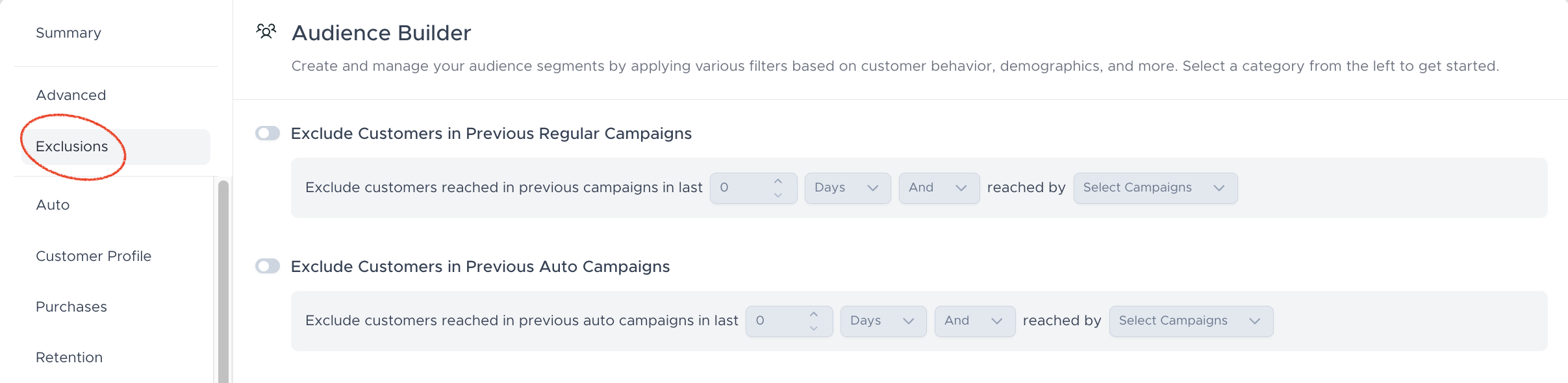
- You have the option to exclude customers reached in the last X number of days or hours and/or with a specific campaign that you select from the drop-down menu
- The number of total targeted and total reachable will be directly affected by this rule as the number of customers already reached will be deducted.