![Kangaroo-Rewards-App-Icon-BLUE-Oct-01-2025-07-47-23-2450-PM.png]](https://support.kangaroorewards.com/hs-fs/hubfs/Kangaroo-Rewards-App-Icon-BLUE-Oct-01-2025-07-47-23-2450-PM.png?height=40&name=Kangaroo-Rewards-App-Icon-BLUE-Oct-01-2025-07-47-23-2450-PM.png)
- Log in to the Kangaroo Business portal and go to the Survey section.
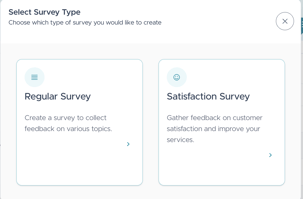
- Click on the New Survey button and then select the Regular Survey.
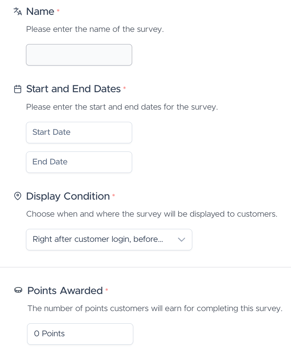
- Fill the Name, Publish and Expiry date as well as the points to be earned by the user fields.
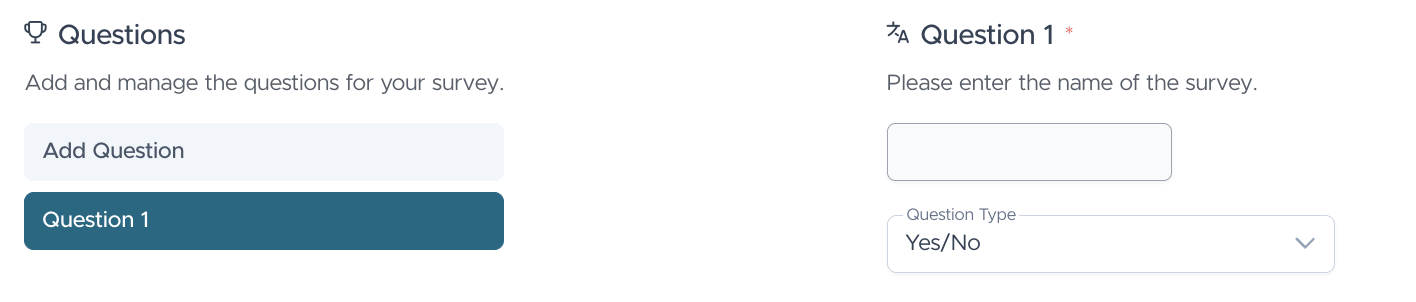
- Add an infinite number questions. The responses can be either with stars, smiley faces, yes/no or text.
- Click on Save.
- Once the survey is created, go to the list, and click on the 3 dots to send it through the marketing engine, by email, or SMS. - Click on the Send Campaign button.

- The page will be redirected to the marketing engine and choose the survey to be sent.
- Choose who should receive the survey.
- Choose how to send it (email/SMS).
- Customize the content of the message to be sent.
- Finally, schedule the delivery of the survey.