---
title: Configuring Approval Mode for Receipt Submissions
description: "Configure how receipts are approved: automatically, manually, or based on a spending threshold to balance fraud protection and efficiency."
---
[Skip to content](https://support.kangaroorewards.com/knowledge/configuring-approval-mode-for-receipt-submissions#main-content)
- [English](https://support.kangaroorewards.com/knowledge/configuring-approval-mode-for-receipt-submissions)
- [Français](https://support.kangaroorewards.com/fr/knowledge/configuring-approval-mode-for-receipt-submissions)
English
Show submenu for translations
[Customer portal](https://support.kangaroorewards.com/tickets-view?hsLang=en)
![Kangaroo-Rewards-App-Icon-BLUE-Oct-01-2025-07-47-23-2450-PM.png\]](https://support.kangaroorewards.com/hs-fs/hubfs/Kangaroo-Rewards-App-Icon-BLUE-Oct-01-2025-07-47-23-2450-PM.png?height=40&name=Kangaroo-Rewards-App-Icon-BLUE-Oct-01-2025-07-47-23-2450-PM.png)
Open main navigation
Close main navigation
- - [English](https://support.kangaroorewards.com/knowledge/configuring-approval-mode-for-receipt-submissions)
- [Français](https://support.kangaroorewards.com/fr/knowledge/configuring-approval-mode-for-receipt-submissions)
English
Show submenu for translations
- [Customer portal](https://support.kangaroorewards.com/tickets-view)
- [Visit Our Website](https://loyalty.kangaroorewards.com/)
[Visit Our Website](https://loyalty.kangaroorewards.com/)
How Can We Help?
- There are no suggestions because the search field is empty.
1. [Help Center](https://support.kangaroorewards.com/knowledge?hsLang=en)
2. [Receipt Scanning](https://support.kangaroorewards.com/knowledge/receipt-scanning?hsLang=en)
# Configuring Approval Mode for Receipt Submissions
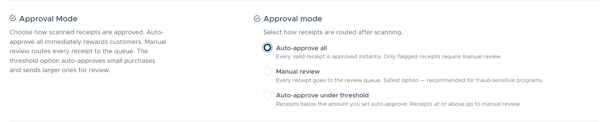
## Approval Mode controls what happens to a receipt immediately after it passes the initial submission checks. You can find this setting under Settings → Receipt Scanning → Approval Mode
There are three options:
**Auto-approve all** — Every receipt that passes validation is approved instantly and points are awarded without any staff involvement. Only submissions that are flagged for potential fraud still require manual review. This option offers the fastest customer experience but provides the least protection against abuse.
**Manual review** — Every receipt, regardless of amount or content, is placed in the review queue for a staff member to approve or reject. This is the **safest option** and is strongly recommended for programs that have experienced fraudulent submissions or handle high-value rewards.
**Auto-approve under threshold** — Receipts with a purchase total below the amount you specify are approved automatically, while receipts at or above that amount are routed to the review queue. This is a balanced option that reduces the staff workload for routine small purchases while keeping larger transactions under human oversight.
**Choosing the right mode**
If you are launching a new program and are unsure of your fraud exposure, start with Manual review. Once you have a sense of your submission patterns, you can switch to Auto-approve under threshold and dial in a sensible cutoff amount. Auto-approve all is best suited for programs with a highly trusted customer base or low reward values where the risk of abuse is minimal.
- [Kangaroo Apps](https://support.kangaroorewards.com/knowledge/kangaroo-apps?hsLang=en#main-content)
- [Amazon - Partner Reward](https://support.kangaroorewards.com/knowledge/kangaroo-apps?hsLang=en#amazon-partner-reward)
- [Email Apps](https://support.kangaroorewards.com/knowledge/kangaroo-apps?hsLang=en#email-apps)
- [Shopify](https://support.kangaroorewards.com/knowledge/kangaroo-apps?hsLang=en#shopify)
- [BigCommerce](https://support.kangaroorewards.com/knowledge/kangaroo-apps?hsLang=en#bigcommerce)
- [WooCommerce](https://support.kangaroorewards.com/knowledge/kangaroo-apps?hsLang=en#woocommerce)
- [Magento V2](https://support.kangaroorewards.com/knowledge/kangaroo-apps?hsLang=en#magento-v2)
- [Lightspeed Ecom](https://support.kangaroorewards.com/knowledge/kangaroo-apps?hsLang=en#lightspeed-ecom)
- [Ecwid (E-Series)](https://support.kangaroorewards.com/knowledge/kangaroo-apps?hsLang=en#ecwid-e-series)
- [Lightspeed Retail](https://support.kangaroorewards.com/knowledge/kangaroo-apps?hsLang=en#lightspeed-retail)
- [Lightspeed X series](https://support.kangaroorewards.com/knowledge/kangaroo-apps?hsLang=en#lightspeed-x-series)
- [Lightspeed K Series](https://support.kangaroorewards.com/knowledge/kangaroo-apps?hsLang=en#lightspeed-k-series)
- [Lightspeed L series](https://support.kangaroorewards.com/knowledge/kangaroo-apps?hsLang=en#lightspeed-l-series)
- [Heartland](https://support.kangaroorewards.com/knowledge/kangaroo-apps?hsLang=en#heartland)
- [Gorgias](https://support.kangaroorewards.com/knowledge/kangaroo-apps?hsLang=en#gorgias)
- [Judge.me](https://support.kangaroorewards.com/knowledge/kangaroo-apps?hsLang=en#judge-me)
- [Ecomz](https://support.kangaroorewards.com/knowledge/kangaroo-apps?hsLang=en#ecomz)
- [System Message](https://support.kangaroorewards.com/knowledge/kangaroo-apps?hsLang=en#system-message)
- [Amazon Business](https://support.kangaroorewards.com/knowledge/kangaroo-apps?hsLang=en#amazon-business)
- [Email/SMS/Push Marketing](https://support.kangaroorewards.com/knowledge/email-sms-push-marketing?hsLang=en#main-content)
- [Consent](https://support.kangaroorewards.com/knowledge/email-sms-push-marketing?hsLang=en#consent)
- [Campaign Reporting](https://support.kangaroorewards.com/knowledge/email-sms-push-marketing?hsLang=en#campaign-reporting)
- [Text - SMS Best Practices](https://support.kangaroorewards.com/knowledge/email-sms-push-marketing?hsLang=en#text-sms-best-practices)
- [Text - SMS](https://support.kangaroorewards.com/knowledge/email-sms-push-marketing?hsLang=en#text-sms)
- [Email](https://support.kangaroorewards.com/knowledge/email-sms-push-marketing?hsLang=en#email)
- [Push](https://support.kangaroorewards.com/knowledge/email-sms-push-marketing?hsLang=en#push)
- [Schedule Campaign](https://support.kangaroorewards.com/knowledge/email-sms-push-marketing?hsLang=en#schedule-campaign)
- [Export List](https://support.kangaroorewards.com/knowledge/email-sms-push-marketing?hsLang=en#export-list)
- [Purchasing Credits](https://support.kangaroorewards.com/knowledge/email-sms-push-marketing?hsLang=en#purchasing-credits)
- [A/B Testing](https://support.kangaroorewards.com/knowledge/email-sms-push-marketing?hsLang=en#a-b-testing)
- [Workflows](https://support.kangaroorewards.com/knowledge/workflows?hsLang=en#main-content)
- [Workflows](https://support.kangaroorewards.com/knowledge/workflows?hsLang=en#workflows)
- [Kangaroo Business Portal App](https://support.kangaroorewards.com/knowledge/kangaroo-business-portal-app?hsLang=en#main-content)
- [Offer business portal app](https://support.kangaroorewards.com/knowledge/kangaroo-business-portal-app?hsLang=en#offer-business-portal-app)
- [Rewards business portal app](https://support.kangaroorewards.com/knowledge/kangaroo-business-portal-app?hsLang=en#rewards-business-portal-app)
- [Marketing business portal app](https://support.kangaroorewards.com/knowledge/kangaroo-business-portal-app?hsLang=en#marketing-business-portal-app)
- [Earning Rule Kangaroo business portal app](https://support.kangaroorewards.com/knowledge/kangaroo-business-portal-app?hsLang=en#earning-rule-kangaroo-business-portal-app)
- [Insights](https://support.kangaroorewards.com/knowledge/kangaroo-business-portal-app?hsLang=en#insights)
- [Points](https://support.kangaroorewards.com/knowledge/points?hsLang=en#main-content)
- [Tablet Earning](https://support.kangaroorewards.com/knowledge/points?hsLang=en#tablet-earning)
- [Earning points in Lightspeed](https://support.kangaroorewards.com/knowledge/points?hsLang=en#earning-points-in-lightspeed)
- [Tiers](https://support.kangaroorewards.com/knowledge/points?hsLang=en#tiers)
- [Reviews](https://support.kangaroorewards.com/knowledge/points?hsLang=en#reviews)
- [Redeeming points](https://support.kangaroorewards.com/knowledge/redeeming-points?hsLang=en#main-content)
- [Tablet Redemption](https://support.kangaroorewards.com/knowledge/redeeming-points?hsLang=en#tablet-redemption)
- [Redemption On Lightspeed Retail POS](https://support.kangaroorewards.com/knowledge/redeeming-points?hsLang=en#redemption-on-lightspeed-retail-pos)
- [Redemption For E-Commerce](https://support.kangaroorewards.com/knowledge/redeeming-points?hsLang=en#redemption-for-e-commerce)
- [Partner Rewards](https://support.kangaroorewards.com/knowledge/redeeming-points?hsLang=en#partner-rewards)
- [Offers](https://support.kangaroorewards.com/knowledge/offers?hsLang=en#main-content)
- [Offer Settings](https://support.kangaroorewards.com/knowledge/offers?hsLang=en#offer-settings)
- [Redeeming Offers](https://support.kangaroorewards.com/knowledge/offers?hsLang=en#redeeming-offers)
- [Lightspeed Conditional Offers](https://support.kangaroorewards.com/knowledge/offers?hsLang=en#lightspeed-conditional-offers)
- [E-Commerce Offers](https://support.kangaroorewards.com/knowledge/offers?hsLang=en#e-commerce-offers)
- [Tiers](https://support.kangaroorewards.com/knowledge/tiers?hsLang=en#main-content)
- [Tier Earning Rules](https://support.kangaroorewards.com/knowledge/tiers?hsLang=en#tier-earning-rules)
- [Override](https://support.kangaroorewards.com/knowledge/tiers?hsLang=en#override)
- [Tier Calculation](https://support.kangaroorewards.com/knowledge/tiers?hsLang=en#tier-calculation)
- [Referrals](https://support.kangaroorewards.com/knowledge/referrals?hsLang=en#main-content)
- [Tablet Referrals](https://support.kangaroorewards.com/knowledge/referrals?hsLang=en#tablet-referrals)
- [Kiosk Tablet Referrals](https://support.kangaroorewards.com/knowledge/referrals?hsLang=en#kiosk-tablet-referrals)
- [Link Referrals](https://support.kangaroorewards.com/knowledge/referrals?hsLang=en#link-referrals)
- [E-Commerce Referrals](https://support.kangaroorewards.com/knowledge/referrals?hsLang=en#e-commerce-referrals)
- [App Referrals](https://support.kangaroorewards.com/knowledge/referrals?hsLang=en#app-referrals)
- [Branded App Referrals](https://support.kangaroorewards.com/knowledge/referrals?hsLang=en#branded-app-referrals)
- [Branding](https://support.kangaroorewards.com/knowledge/branding?hsLang=en#main-content)
- [Slideshow](https://support.kangaroorewards.com/knowledge/branding?hsLang=en#slideshow)
- [App Colors](https://support.kangaroorewards.com/knowledge/branding?hsLang=en#app-colors)
- [Release Notes](https://support.kangaroorewards.com/knowledge/release-notes?hsLang=en)
- [Rules](https://support.kangaroorewards.com/knowledge/rules?hsLang=en#main-content)
- [E-Commerce Rules](https://support.kangaroorewards.com/knowledge/rules?hsLang=en#e-commerce-rules)
- [Multi-Factor Authentication (MFA)](https://support.kangaroorewards.com/knowledge/rules?hsLang=en#multi-factor-authentication-mfa)
- [A La Carte](https://support.kangaroorewards.com/knowledge/rules?hsLang=en#a-la-carte)
- [Customers](https://support.kangaroorewards.com/knowledge/customers?hsLang=en#main-content)
- [Tags](https://support.kangaroorewards.com/knowledge/customers?hsLang=en#tags)
- [Customers](https://support.kangaroorewards.com/knowledge/customers?hsLang=en#customers)
- [Gamification](https://support.kangaroorewards.com/knowledge/gamification?hsLang=en#main-content)
- [Draw](https://support.kangaroorewards.com/knowledge/gamification?hsLang=en#draw)
- [Spin To Win](https://support.kangaroorewards.com/knowledge/gamification?hsLang=en#spin-to-win)
- [Gift Cards](https://support.kangaroorewards.com/knowledge/gift-cards?hsLang=en#main-content)
- [Purchasing Gift Cards](https://support.kangaroorewards.com/knowledge/gift-cards?hsLang=en#purchasing-gift-cards)
- [App Gift Cards](https://support.kangaroorewards.com/knowledge/gift-cards?hsLang=en#app-gift-cards)
- [Analytics](https://support.kangaroorewards.com/knowledge/analytics?hsLang=en#main-content)
- [Dashboard](https://support.kangaroorewards.com/knowledge/analytics?hsLang=en#dashboard)
- [Marketing](https://support.kangaroorewards.com/knowledge/analytics?hsLang=en#marketing)
- [Branches](https://support.kangaroorewards.com/knowledge/branches?hsLang=en#main-content)
- [Employees](https://support.kangaroorewards.com/knowledge/branches?hsLang=en#employees)
- [Kiosk](https://support.kangaroorewards.com/knowledge/kiosk?hsLang=en)
- [Frequent Buyers Program](https://support.kangaroorewards.com/knowledge/frequent-buyers-program?hsLang=en)
- [Surveys](https://support.kangaroorewards.com/knowledge/surveys?hsLang=en)
- [Merchant App](https://support.kangaroorewards.com/knowledge/merchant-app?hsLang=en)
- [White Label App](https://support.kangaroorewards.com/knowledge/white-label-app?hsLang=en#main-content)
- [QR code Integration](https://support.kangaroorewards.com/knowledge/white-label-app?hsLang=en#qr-code-integration)
- [Business portal](https://support.kangaroorewards.com/knowledge/business-portal?hsLang=en#main-content)
- [Upload Clients](https://support.kangaroorewards.com/knowledge/business-portal?hsLang=en#upload-clients)
- [Transaction List](https://support.kangaroorewards.com/knowledge/business-portal?hsLang=en#transaction-list)
- [Branches](https://support.kangaroorewards.com/knowledge/business-portal?hsLang=en#branches)
- [Subscription](https://support.kangaroorewards.com/knowledge/subscription?hsLang=en)
- [Points Earning](https://support.kangaroorewards.com/knowledge/points-earning?hsLang=en)
- [Members App](https://support.kangaroorewards.com/knowledge/members-app?hsLang=en#main-content)
- [Web App](https://support.kangaroorewards.com/knowledge/members-app?hsLang=en#web-app)
- [Mobile App](https://support.kangaroorewards.com/knowledge/members-app?hsLang=en#mobile-app)
- [A La Carte](https://support.kangaroorewards.com/knowledge/a-la-carte?hsLang=en)
- [New Business Portal](https://support.kangaroorewards.com/knowledge/new-business-portal?hsLang=en#main-content)
- [Marketing](https://support.kangaroorewards.com/knowledge/new-business-portal?hsLang=en#marketing)
- [Business Profile](https://support.kangaroorewards.com/knowledge/business-profile?hsLang=en#main-content)
- [Branches](https://support.kangaroorewards.com/knowledge/business-profile?hsLang=en#branches)
- [Social Media](https://support.kangaroorewards.com/knowledge/business-profile?hsLang=en#social-media)
- [Import Transaction](https://support.kangaroorewards.com/knowledge/import-transaction?hsLang=en#main-content)
- [Import Transactions](https://support.kangaroorewards.com/knowledge/import-transaction?hsLang=en#import-transactions)
- [One-Pagers](https://support.kangaroorewards.com/knowledge/one-pagers?hsLang=en#main-content)
- [Marketing](https://support.kangaroorewards.com/knowledge/one-pagers?hsLang=en#marketing)
- [Referral](https://support.kangaroorewards.com/knowledge/one-pagers?hsLang=en#referral)
- [Integration](https://support.kangaroorewards.com/knowledge/one-pagers?hsLang=en#integration)
- [Gift Cards](https://support.kangaroorewards.com/knowledge/one-pagers?hsLang=en#gift-cards)
- [Kiosk Mode](https://support.kangaroorewards.com/knowledge/one-pagers?hsLang=en#kiosk-mode)
- [App Colors](https://support.kangaroorewards.com/knowledge/one-pagers?hsLang=en#app-colors)
- [Branches](https://support.kangaroorewards.com/knowledge/one-pagers?hsLang=en#branches)
- [Products](https://support.kangaroorewards.com/knowledge/one-pagers?hsLang=en#products)
- [Customer Management](https://support.kangaroorewards.com/knowledge/one-pagers?hsLang=en#customer-management)
- [Business Portal](https://support.kangaroorewards.com/knowledge/one-pagers?hsLang=en#business-portal)
- [Rules](https://support.kangaroorewards.com/knowledge/one-pagers?hsLang=en#rules)
- [E-Commerce](https://support.kangaroorewards.com/knowledge/one-pagers?hsLang=en#e-commerce)
- [Merchant App](https://support.kangaroorewards.com/knowledge/one-pagers?hsLang=en#merchant-app)
- [Enrollment](https://support.kangaroorewards.com/knowledge/one-pagers?hsLang=en#enrollment)
- [Security & Privacy](https://support.kangaroorewards.com/knowledge/one-pagers?hsLang=en#security-privacy)
- [FAQ](https://support.kangaroorewards.com/knowledge/faq?hsLang=en#main-content)
- [FAQ- Lightspeed R Series](https://support.kangaroorewards.com/knowledge/faq?hsLang=en#faq-lightspeed-r-series)
- [FAQ- Shopify POS](https://support.kangaroorewards.com/knowledge/faq?hsLang=en#faq-shopify-pos)
- [FAQ- Shopify ECOM](https://support.kangaroorewards.com/knowledge/faq?hsLang=en#faq-shopify-ecom)
- [FAQ- Lightspeed ECOM](https://support.kangaroorewards.com/knowledge/faq?hsLang=en#faq-lightspeed-ecom)
- [FAQ - WooCommerce](https://support.kangaroorewards.com/knowledge/faq?hsLang=en#faq-woocommerce)
- [FAQ - Standalone](https://support.kangaroorewards.com/knowledge/faq?hsLang=en#faq-standalone)
- [FAQ - BigCommerce](https://support.kangaroorewards.com/knowledge/faq?hsLang=en#faq-bigcommerce)
- [FAQ - Magento](https://support.kangaroorewards.com/knowledge/faq?hsLang=en#faq-magento)
- [FAQ-Heartland](https://support.kangaroorewards.com/knowledge/faq?hsLang=en#faq-heartland)
- [FAQ - Judge.me](https://support.kangaroorewards.com/knowledge/faq?hsLang=en#faq-judge-me)
- [FAQ- Lightspeed X Series](https://support.kangaroorewards.com/knowledge/faq?hsLang=en#faq-lightspeed-x-series)
- [FAQ- Lightspeed K Series](https://support.kangaroorewards.com/knowledge/faq?hsLang=en#faq-lightspeed-k-series)
- [FAQ- Lightspeed L Series](https://support.kangaroorewards.com/knowledge/faq?hsLang=en#faq-lightspeed-l-series)
- [FAQ - Lightspeed E Series (Ecwid)](https://support.kangaroorewards.com/knowledge/faq?hsLang=en#faq-lightspeed-e-series-ecwid)
- [FAQ - MindBody POS](https://support.kangaroorewards.com/knowledge/faq?hsLang=en#faq-mindbody-pos)
- [API](https://support.kangaroorewards.com/knowledge/api?hsLang=en)
- [Kangaroo Reviews](https://support.kangaroorewards.com/knowledge/kangaroo-reviews?hsLang=en#main-content)
- [General Settings](https://support.kangaroorewards.com/knowledge/kangaroo-reviews?hsLang=en#general-settings)
- [Reviews Widget](https://support.kangaroorewards.com/knowledge/kangaroo-reviews?hsLang=en#reviews-widget)
- [Reviews Carousel](https://support.kangaroorewards.com/knowledge/kangaroo-reviews?hsLang=en#reviews-carousel)
- [Manage Reviews](https://support.kangaroorewards.com/knowledge/kangaroo-reviews?hsLang=en#manage-reviews)
- [Live Geo-Tracking](https://support.kangaroorewards.com/knowledge/live-geo-tracking?hsLang=en#main-content)
- [Live - Geo](https://support.kangaroorewards.com/knowledge/live-geo-tracking?hsLang=en#live-geo)
- [Receipt Scanning](https://support.kangaroorewards.com/knowledge/receipt-scanning?hsLang=en)
[](http://www.kangaroorewards.com)
www.kangaroorewards.com Help Center
Copyright © 2026, © Kangaroo Rewards