![Kangaroo-Rewards-App-Icon-BLUE-Oct-01-2025-07-47-23-2450-PM.png]](https://support.kangaroorewards.com/hs-fs/hubfs/Kangaroo-Rewards-App-Icon-BLUE-Oct-01-2025-07-47-23-2450-PM.png?height=40&name=Kangaroo-Rewards-App-Icon-BLUE-Oct-01-2025-07-47-23-2450-PM.png)
- Go in the Inventory section in Lightspeed and click on Item Search.

- Search the product to include in the tag and click on it.
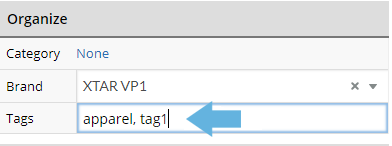
- Scroll down to the Organize section.
- Type the Tag in the Tags section.
- Click on Save Changes to finalize.