![Kangaroo-Rewards-App-Icon-BLUE-Oct-01-2025-07-47-23-2450-PM.png]](https://support.kangaroorewards.com/hs-fs/hubfs/Kangaroo-Rewards-App-Icon-BLUE-Oct-01-2025-07-47-23-2450-PM.png?height=40&name=Kangaroo-Rewards-App-Icon-BLUE-Oct-01-2025-07-47-23-2450-PM.png)
Customers can reset their pin from the merchant app on the tablet directly.
Follow the below steps:
Follow the below steps:
- Go to the Merchant App.
- The users should enter their identifier (either Email or Phone Number)
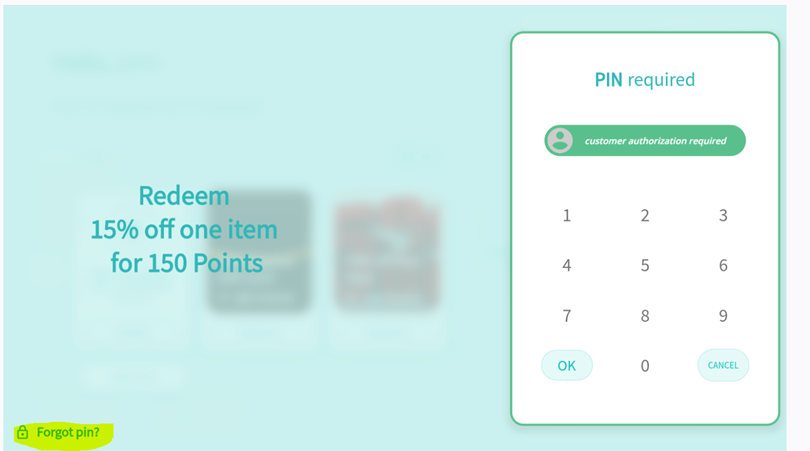
Proceed to redeem an option from the redemption catalog. - The user needs to enter his pin but he doesn’t have it so on the left bottom of the screen he clicks on FORGET PIN.
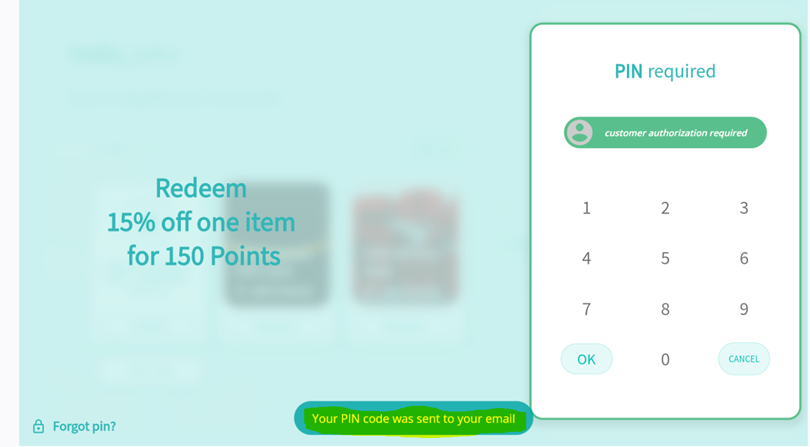
- On the bottom of the screen, he will see a message Your PIN code was sent to your email or phone it depends on the identifier.
- The user should check his email to get his new PIN.