![Kangaroo-Rewards-App-Icon-BLUE-Oct-01-2025-07-47-23-2450-PM.png]](https://support.kangaroorewards.com/hs-fs/hubfs/Kangaroo-Rewards-App-Icon-BLUE-Oct-01-2025-07-47-23-2450-PM.png?height=40&name=Kangaroo-Rewards-App-Icon-BLUE-Oct-01-2025-07-47-23-2450-PM.png)
To submit a review for a product on a Shopify store, follow these steps:
- Navigate to the Product Page: Go to the specific product page you wish to review.

- Find the Review Widget: Scroll down to the reviews section, where you will find the option to write a review.

- Enter Review Details: In the review section, you'll be prompted to:
- Select a star rating (from 1 to 5 stars).
- Enter your name and email address.
- Write a title for your review.
- Provide a detailed review of the product.
- You can also upload photos or videos to support your review, if applicable.
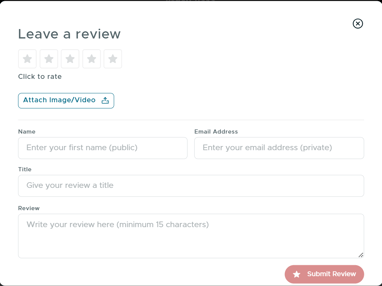
- Submit Your Review: After filling out the necessary information, click the "Submit" button to send your review.
Note: Once your review is submitted, it will be visible to the store owner for approval. If you want to remove or unpublish a review after submission, this option is not available to customers. The store owner has the ability to publish, unpublish, or delete reviews.