![Kangaroo-Rewards-App-Icon-BLUE-Oct-01-2025-07-47-23-2450-PM.png]](https://support.kangaroorewards.com/hs-fs/hubfs/Kangaroo-Rewards-App-Icon-BLUE-Oct-01-2025-07-47-23-2450-PM.png?height=40&name=Kangaroo-Rewards-App-Icon-BLUE-Oct-01-2025-07-47-23-2450-PM.png)
- From your current Kangaroo Business Portal, click on “Back to old portal.”
-
This will redirect you to the previous interface where this setting is located.
-
Go to the “Settings” section in the old portal.
-
Locate the rule titled “Allow change consent in self-signup context.”

-
Enable or Disable the Option
-
To allow change of consent: Turn ON the toggle for “Allow change consent in self-signup context.”
-
This activation lets you modify a customer’s consent directly from Lightspeed Retail.
-
-
To prevent change of consent: Turn OFF the toggle.
-
When disabled, you will not have the ability to adjust customer consent through Lightspeed.
-
-
-
How the Setting Works Inside Lightspeed Retail
-
In Lightspeed Retail, go to “Attach to Sale.”
-
Search for an existing customer profile.
-
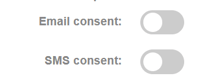
If the setting is ON, you will see the option to change the customer’s consent.
-
If the setting is OFF, the consent field will be locked and cannot be modified.
-
-
Summary
-
ON = Consent can be changed during the attach-to-sale process in Lightspeed.
-
OFF = Consent cannot be changed in Lightspeed.
-