![Kangaroo-Rewards-App-Icon-BLUE-Oct-01-2025-07-47-23-2450-PM.png]](https://support.kangaroorewards.com/hs-fs/hubfs/Kangaroo-Rewards-App-Icon-BLUE-Oct-01-2025-07-47-23-2450-PM.png?height=40&name=Kangaroo-Rewards-App-Icon-BLUE-Oct-01-2025-07-47-23-2450-PM.png)
- In the Customers section in Lightspeed go to the Customer section.
- Click on the New Customer button at the top right of the page.
- Enter the customer's information (Name, Email, Phone Number, Etc.)
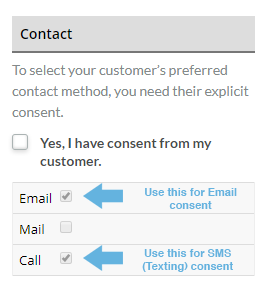
- Use the top right consent options to consent customers. Click email to consent a customer for emails and/or click call to consent customers for text marketing.
- Click on the Save Changes button when done.