![Kangaroo-Rewards-App-Icon-BLUE-Oct-01-2025-07-47-23-2450-PM.png]](https://support.kangaroorewards.com/hs-fs/hubfs/Kangaroo-Rewards-App-Icon-BLUE-Oct-01-2025-07-47-23-2450-PM.png?height=40&name=Kangaroo-Rewards-App-Icon-BLUE-Oct-01-2025-07-47-23-2450-PM.png)
- Go to Kangaroo Rewards business portal.
- Click on Settings.
- Click on Apps & Integrations.
- Click on Configure under your Ecom Integration.
- Scroll down to the Widget Targeting Section and toggle it on.

- Then Click on Configure URL Targeting.

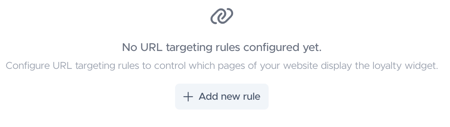
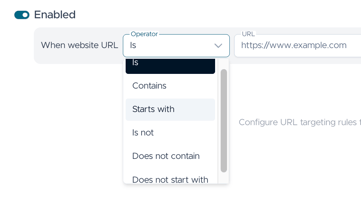
- Click on Add new rule and Select one of the six available conditions + the URL of the page .
- Enable/disable or delete the condition by pressing on the highlighted buttons.
- Add an unlimited amount of rules by pressing on Add New Rule.
- Press Save to finalize.
Please note that the conditions 'Is' and 'Is Not' only support URLs.