- Go to the Kangaroo Business portal and go to the Marketing - All Campaigns section.
- Click on the Create a new Campaign button.
- Select if the campaign is to be sent by Email, SMS, or Push.
- Choose the campaign to be sent to Targeted Customers and open the Audience Builder.
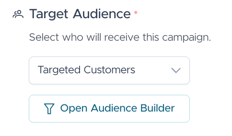
- Select the Specific Customer filter to target this one customer of this campaign from the Customer Profile section of the Filter categories

- Fill in the mobile number or the email address of the user
- Click Send Immediately to send the campaign out to the above-mentioned customer in the filter.
English
![Kangaroo-Rewards-App-Icon-BLUE-Oct-01-2025-07-47-23-2450-PM.png]](https://support.kangaroorewards.com/hs-fs/hubfs/Kangaroo-Rewards-App-Icon-BLUE-Oct-01-2025-07-47-23-2450-PM.png?height=40&name=Kangaroo-Rewards-App-Icon-BLUE-Oct-01-2025-07-47-23-2450-PM.png)