- Go to the Kangaroo Business portal and go to the Marketing - All Campaigns section.
- Search for the Campaign you want to resend from the sections and lists available.
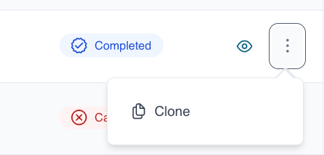
- Click on the 3 dots next to the campaign you want to resend.
- Click on "Clone"
- The setting and content of the previous campaign will be loaded in the marketing campaign portal, ready to be launched again.
English
![Kangaroo-Rewards-App-Icon-BLUE-Oct-01-2025-07-47-23-2450-PM.png]](https://support.kangaroorewards.com/hs-fs/hubfs/Kangaroo-Rewards-App-Icon-BLUE-Oct-01-2025-07-47-23-2450-PM.png?height=40&name=Kangaroo-Rewards-App-Icon-BLUE-Oct-01-2025-07-47-23-2450-PM.png)