![Kangaroo-Rewards-App-Icon-BLUE-Oct-01-2025-07-47-23-2450-PM.png]](https://support.kangaroorewards.com/hs-fs/hubfs/Kangaroo-Rewards-App-Icon-BLUE-Oct-01-2025-07-47-23-2450-PM.png?height=40&name=Kangaroo-Rewards-App-Icon-BLUE-Oct-01-2025-07-47-23-2450-PM.png)
- Go to the Kangaroo Business Portal.
- Go to Settings.
- Go to Apps & Integrations.
- Go to Ecwid and click on Configure.
- Choose to make customers point exempt based on the Ecwid Customer groups or Customer email domain by scrolling down to the Point exempt section.
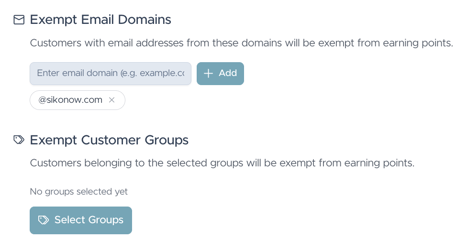
- Make sure to always enable the check box for the Point Exempt Login Check rule.

- Click on Save to save the changes made.