![Kangaroo-Rewards-App-Icon-BLUE-Oct-01-2025-07-47-23-2450-PM.png]](https://support.kangaroorewards.com/hs-fs/hubfs/Kangaroo-Rewards-App-Icon-BLUE-Oct-01-2025-07-47-23-2450-PM.png?height=40&name=Kangaroo-Rewards-App-Icon-BLUE-Oct-01-2025-07-47-23-2450-PM.png)
- Go to Kangaroo Rewards business portal.
- Click on Settings.
- Click on Earning & Redeeming.
- Scroll down to the Pay with Points section.
- Choose to enable or disable this feature.

- You can set the ratio and choose if you want it Platform specific (depends on your integrations) or applicable for all platforms.
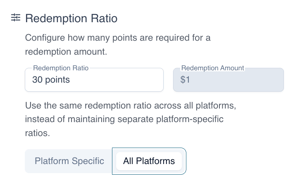
Rule related to the Pay with Points feature:
- Enabled: Choose to enable to diable this functionality at any point in time
- Redemption Ratio/Redemption amount: Choose how many points will be converted into how many $. Enter the amounts in the correct fields
- Minimum points Redeemable: This is the minimum number of points needed to apply a redemption using the pay with points functionality
- Maximum redemption %: This is the maximum amount allowed to be redeemed based on a % of the subtotal of the sale.