![Kangaroo-Rewards-App-Icon-BLUE-Oct-01-2025-07-47-23-2450-PM.png]](https://support.kangaroorewards.com/hs-fs/hubfs/Kangaroo-Rewards-App-Icon-BLUE-Oct-01-2025-07-47-23-2450-PM.png?height=40&name=Kangaroo-Rewards-App-Icon-BLUE-Oct-01-2025-07-47-23-2450-PM.png)
- Access the Kangaroo Kangaroo Business portal.
- Go to the Customers section - Customers Management in the main menu.
- Search for the client using the Filter and click on the eye icon to access their profile, on the right.
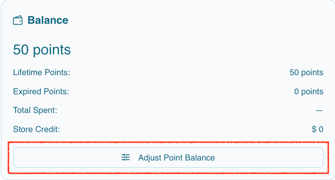
- Once in the customer profile, scroll down to the section containing the point balance of the customer and click on Adjust Point Balance.
- It will display where you can add or deduct X amount of points from the client's balance.
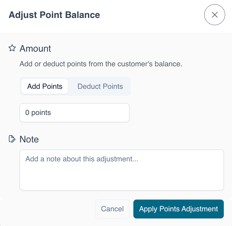
- Once done, kindly don't forget to press on Apply Points Adjustments.