![Kangaroo-Rewards-App-Icon-BLUE-Oct-01-2025-07-47-23-2450-PM.png]](https://support.kangaroorewards.com/hs-fs/hubfs/Kangaroo-Rewards-App-Icon-BLUE-Oct-01-2025-07-47-23-2450-PM.png?height=40&name=Kangaroo-Rewards-App-Icon-BLUE-Oct-01-2025-07-47-23-2450-PM.png)
Custom variables can be added directly in the Mobile Message field when creating an SMS campaign.
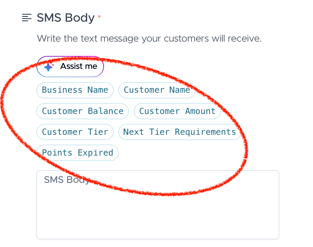
To add a custom variable:
Click inside the Mobile Message text box.
Choose the variable you want to insert into your message.
The following variables are available for SMS campaigns:
-
Customer Name
- Customer Balance
- Customer Amount
-
Customer Tier
- Next Tier Requirements
- Points Expired
-
Customer Balance
Once selected, the variable will appear in the message content.
N.B: The variable will be replaced with the correct customer value at the time the SMS is sent.