![Kangaroo-Rewards-App-Icon-BLUE-Oct-01-2025-07-47-23-2450-PM.png]](https://support.kangaroorewards.com/hs-fs/hubfs/Kangaroo-Rewards-App-Icon-BLUE-Oct-01-2025-07-47-23-2450-PM.png?height=40&name=Kangaroo-Rewards-App-Icon-BLUE-Oct-01-2025-07-47-23-2450-PM.png)
Custom variables can be added directly in the Mobile Message field when creating an SMS campaign.
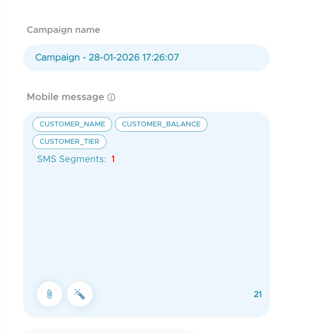
To add a custom variable:
Click inside the Mobile Message text box.
Select Custom Variables to open the drop down list of available options.
Choose the variable you want to insert into your message.
The following variables are available for SMS campaigns:
-
Customer Name
-
Customer Tier
-
Customer Balance
Once selected, the variable will appear in the message content.
N.B: The variable will be replaced with the correct customer value at the time the SMS is sent.