![Kangaroo-Rewards-App-Icon-BLUE-Oct-01-2025-07-47-23-2450-PM.png]](https://support.kangaroorewards.com/hs-fs/hubfs/Kangaroo-Rewards-App-Icon-BLUE-Oct-01-2025-07-47-23-2450-PM.png?height=40&name=Kangaroo-Rewards-App-Icon-BLUE-Oct-01-2025-07-47-23-2450-PM.png)
- Go to the business portal.
- Click on the "Offers" section.
- Click on "Create an offer".
- Select the Type of your offer.
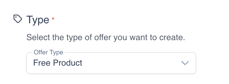
- Fill out the short form to create the business offer: title, image...
- Select audience.
- Select the Start date (date the business is publishing the offer).
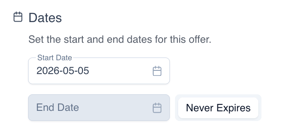
Note that the publish date cannot be modified once the offer is live. If you are looking to change the publish date you will need to remove this offer and create a new one with the modified publish date.
- Select the expiry date ( End period of the offer)
- Or the business can select the "Never Expires" option.
- Click on "Save"
The business offer will only appear to customers from the moment it becomes published, not before