- Go to the Kangaroo Business portal and go to the Customers - Customer Management section.
- Search for the user in the Filter section by Email/Phone.
- Click on the the small Eye Icon for User Details.
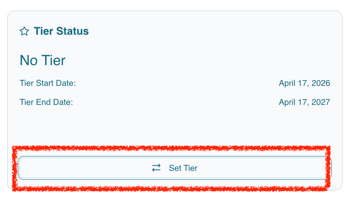
- Override Tier Status by clicking on the Set Tier button under the tiers section.
- Change the assignment to "Manually Assigned" and choose the tier you want them to be in. Click on Set Tier.
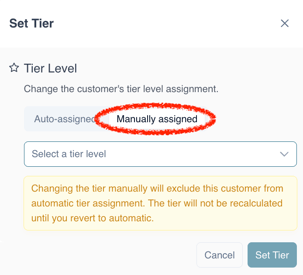
- Note that this will override the tier rules and conditions.
English
![Kangaroo-Rewards-App-Icon-BLUE-Oct-01-2025-07-47-23-2450-PM.png]](https://support.kangaroorewards.com/hs-fs/hubfs/Kangaroo-Rewards-App-Icon-BLUE-Oct-01-2025-07-47-23-2450-PM.png?height=40&name=Kangaroo-Rewards-App-Icon-BLUE-Oct-01-2025-07-47-23-2450-PM.png)