![Kangaroo-Rewards-App-Icon-BLUE-Oct-01-2025-07-47-23-2450-PM.png]](https://support.kangaroorewards.com/hs-fs/hubfs/Kangaroo-Rewards-App-Icon-BLUE-Oct-01-2025-07-47-23-2450-PM.png?height=40&name=Kangaroo-Rewards-App-Icon-BLUE-Oct-01-2025-07-47-23-2450-PM.png)
Here's how you can easily set them up:
- Go to your Business portal.
- Click on the Offers section.
- Click on Create an offer.
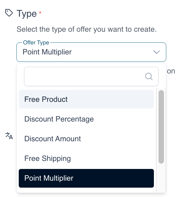
- Select your offer type.
5. Fill out the title , upload an image...
Description (if applicable).
Note: This is where you can add restrictions such as *Cannot be bundled with items on sale.
6. Select your audience.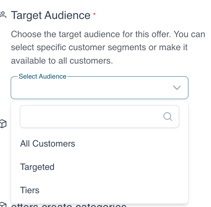
7. Select the start and end date , location or branch availability.
8. Click Save at the bottom of the page and this offer will be saved.