![Kangaroo-Rewards-App-Icon-BLUE-Oct-01-2025-07-47-23-2450-PM.png]](https://support.kangaroorewards.com/hs-fs/hubfs/Kangaroo-Rewards-App-Icon-BLUE-Oct-01-2025-07-47-23-2450-PM.png?height=40&name=Kangaroo-Rewards-App-Icon-BLUE-Oct-01-2025-07-47-23-2450-PM.png)
Once connected, ChatGPT can help you retrieve information from your Kangaroo account, including:
- Business details
- Customer profiles
- Points and transaction history
- Marketing campaigns
- Offers and rewards
- Redemptions
- Loyalty program settings
- Performance and marketing metrics
- Campaign status and engagement
- Attributed revenue and other aggregate reports
How to Connect the Kangaroo Rewards Plugin
1. Open the Kangaroo Rewards Plugin
Click this link for the Kangaroo Rewards plugin or search for Kangaroo Rewards in your plugins section.
On the plugin page, click Install Plugin.

2. Connect Your Kangaroo Account
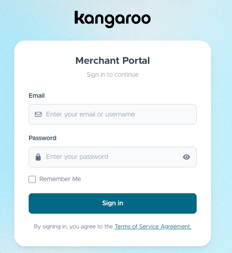
After clicking Install Plugin, you will be redirected to the Kangaroo Business Portal.
Log in using your Kangaroo Business Portal credentials and authorize the connection.
Once the connection is completed, your Kangaroo account will be linked to ChatGPT through the Kangaroo Rewards plugin.
Note: The information available to ChatGPT depends on the access and permissions associated with your connected Kangaroo account.
3. Start Asking Questions
Once connected, open a new ChatGPT conversation and select or invoke the Kangaroo Rewards plugin from the Plugins/Tools section.
You can then ask questions about your Kangaroo account in plain language.
For example:
- "How many active customers do I have?"
- "How many points were redeemed this month?"
ChatGPT can use the connected Kangaroo data to provide context and help you understand your loyalty program performance.
Important
The Kangaroo Rewards plugin provides access to the information available through your connected Kangaroo account. It does not replace the Kangaroo Business Portal. For detailed account management and configuration, continue using the Kangaroo Business Portal.
TroubleshootingIf ChatGPT cannot retrieve your Kangaroo information:
- Make sure you are logged into the correct Kangaroo Business Portal account.
- Check that the Kangaroo Rewards plugin is installed and connected.
- Make sure the plugin is selected or enabled in ChatGPT.
- Try asking your question again using more specific wording.
- If the issue continues, contact Kangaroo Support for assistance.
Get Started
Connect the Kangaroo Rewards plugin to your ChatGPT account and start asking questions about your loyalty program using simple, everyday language.